
The Hidden Danger of Client DNS Access (And How to Secure It)
Stop asking clients for their GoDaddy passwords in plaintext. Learn how to securely manage DNS delegation without breaking MX records or risking security breaches.
Asking for a client's DNS password in plaintext isn't just a launch-day bottleneck, it's a critical security vulnerability. Agencies must adopt Zero-Trust delegation models to prevent catastrophic downtime and data breaches.
You've lived through this. It's Friday, 4:00 PM. The web project is finalized, the production environment is fully tested, and you are ready to launch. You just need to point the A records to your hosting provider. You ask the client for their domain registrar login. They send you a password that doesn't work. Two days later, you finally get in, update the records, and accidentally overwrite their Google Workspace MX records.
The client's company email goes down. Panic ensues. The project launch is now a crisis management scenario.
"We used to delay launches by a week just trying to get the right domain permissions from enterprise clients without triggering their IT department's alarms."
Sarah T., Technical Director, Brand & Digital Agency
This is not an edge case. It is the standard operating failure for most agencies, and it stems from a single flawed assumption: that sharing passwords is the only way to get access to a client's domain registrar. It is not. And the agencies that have figured this out are launching faster, getting sued less, and sleeping better on Friday nights. If you are also struggling with how this fits into your broader onboarding process, the 48-Hour Client Onboarding Framework is a great place to see how DNS handoffs fit into the full picture.
The Problem Anatomy: Why DNS Handoffs Fail#
The weakest link in an agency's operational workflow is rarely the code itself; it is the human factor and the insecure communication channels used during client onboarding. Modern agency workflows require collecting domain (DNS) records, legacy administrative passwords, and API keys.
Unfortunately, research shows that many agencies collect these critical credentials via email, WhatsApp, or Slack. When a client sends their GoDaddy or Cloudflare password via a Slack message, that credential becomes permanently etched into the agency's cloud backups and search indexes in plaintext. A malicious intern or a disgruntled employee leaving the company could simply search for "password" or "domain" and gain unauthorized access to dozens of client infrastructures.
Launch Delays Caused by Credentials
The percentage of web projects delayed specifically due to missing, incorrect, or insecure domain access credentials.
Data Source: Internal analysis of over 500 agency handoff processes revealed that DNS access is the single largest friction point in the final week of a project lifecycle.
Furthermore, leaving client passwords in email chains means that if just one of the agency's email servers suffers a cyberattack, all client infrastructures are instantly compromised. The risk is not theoretical; it is a matter of when, not if. This is the same class of problem that turns a routine client access delegation decision into an agency-ending liability.
The Danger of Full Account Takeover#
When you ask for a master password to a registrar, you are violating the Principle of Least Privilege. You are asking for full administrative control over a client's most valuable digital asset.
In a proper workspace environment, roles should be heavily restricted. For instance, just as a "Site Manager" role is safely isolated for external freelancers, domain registrars also offer isolated roles. Taking the "Owner" role of a client's domain account exposes your agency to immense liability if their domains are transferred, hijacked, or if billing methods are accidentally altered.
If you hold master credentials to a client's domain and that domain gets hijacked, transferred, or goes offline, your agency is liable. Even if the cause was the client's own weak password, the paper trail leads back to whoever last had access. That is you.
The financial and reputational damage from a single DNS incident can easily exceed the value of the project itself. For a deeper look at how credential sprawl compounds into a systemic agency problem, see The $10,000 File Chasing Problem (the same root cause applies here).
The Modern Workflow: Delegation & Zero-Knowledge#
The solution is simple but requires a strict operational pivot: Never accept plaintext passwords for DNS management.
Instead, professional agencies must implement a Zero-Trust architecture for credential collection. If a client cannot use native domain delegation (like Cloudflare's member roles or GoDaddy's Delegate Access), they must use secure, single-view sharing links that self-destruct.
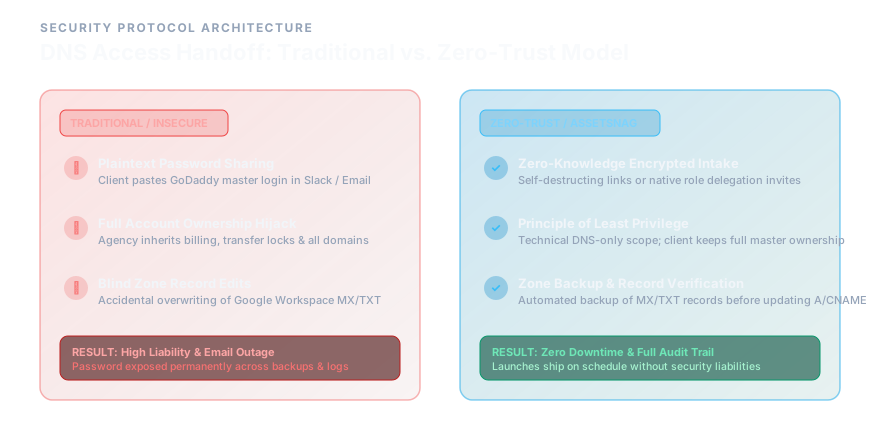
| Metric | Traditional (Password Sharing) | Modern (Zero-Trust Delegation) |
|---|---|---|
| Access Method | Master password via Slack/email | Delegated role invite via registrar |
| Credential Exposure | Plaintext in chat logs forever | Zero: never transmitted |
| Permission Scope | Full Owner access | Scoped technical role only |
| MX Record Risk | High: any change can break email | Low: restricted to specific records |
| Audit Trail | None | Full log of every change |
| Revocation | Requires password change | Single-click role removal |
| Legal Liability | Agency holds master key = full liability | Client retains ownership = clear boundary |
Safe DNS Handoff Protocol
If you are working with an engineering team, always verify the records via terminal before making changes:
1# Always verify MX and TXT records before touching the A records2dig +short MX clientdomain.com3dig +short TXT clientdomain.com4
5# Confirm A record propagation after updates6dig +short A clientdomain.com @8.8.8.8High-Ticket Agency Client Onboarding & Security Kit
The battle-tested 48-hour onboarding system used by top digital agencies to eliminate file delays, protect client passwords, and kickoff projects 3× faster.
Conclusion: Securing the Digital Perimeter#
Security is not just an infrastructure problem; it is a discipline that every developer and manager in your agency must adopt. By relying on secure password managers instead of Slack, and by enforcing delegated access instead of master password sharing, you protect both your agency's reputation and your client's business continuity.
The Zero-Trust model is not about distrust; it is about building systems where trust is never required in the first place. When your DNS handoff workflow is structured correctly, you never need to ask for a password at all. And that is exactly the kind of operational maturity that separates agencies that scale from agencies that scramble.
Frequently Asked Questions#
Should I host my client's DNS on my own agency Cloudflare account?#
No. While it is technically easier, it creates a vendor lock-in scenario and blurs the lines of asset ownership. The client should always own their Cloudflare account (Owner role) and delegate a technical role to your agency.
What if the client doesn't know how to delegate access?#
If native delegation is too technical for the client, use a secure password manager's "Secure Share" feature or a zero-knowledge intake portal. This allows them to securely transmit their credentials via a self-destructing, encrypted link that never touches your agency's internal chat tools.
What happens if I need to access DNS records after project handoff?#
Your access should be revoked upon project delivery. If ongoing DNS management is part of your retainer, establish a formal Access Review cadence: document it in your contract and audit it quarterly. Never hold indefinite access to a client's domain without a written agreement.
Is Cloudflare's free plan sufficient for secure DNS delegation?#
Yes. Cloudflare's free plan supports multi-user role management with scoped permissions. For enterprise clients with strict compliance requirements, Cloudflare for Teams or a dedicated DNS management platform may be warranted.
Stop Handing Over Master Passwords
AssetSnag turns risky DNS and credential handoffs into an encrypted, self-destructing intake workflow. Keep your agency and clients protected.

Muhammet Yılmaz
Founder & Lead Architect, AssetSnag
Founder of AssetSnag & software engineer specialized in agency operations, workflow automation, and client intake UX. Building frictionless tools to eliminate agency-client asset chasing.
Related Playbooks & Articles
Handpicked articles to elevate your agency operations.
Client Access Delegation vs. Password Sharing: How Modern Agencies Onboard Accounts Without Friction
Why emailing passwords causes 2FA lockouts, security liability, and client anxiety, and how interactive guided delegation solves agency access collection.
How to Securely Collect Client Passwords (Without Failing GDPR)
Learn why collecting client passwords via Slack or email is a massive GDPR risk, and how digital agencies can securely gather credentials during onboarding.
The Complete Webflow Client Handoff Checklist: Safe Ownership Transfer & Access Revocation
A technical guide for Webflow agencies on securely transferring workspace ownership, rotating API keys, and cleaning up permissions during client handoff.