
The Complete Webflow Client Handoff Checklist: Safe Ownership Transfer & Access Revocation
A technical guide for Webflow agencies on securely transferring workspace ownership, rotating API keys, and cleaning up permissions during client handoff.
The Core Thesis: Project handoff is an operational security event, not just sending an invoice. Traditional handoff workflows that fail to systematically rotate API keys, audit custom code, and clean up workspace permissions leave agencies legally liable. Modern agencies must treat delivery as a definitive transfer of technical liability.
Most digital agencies don't suffer from a design or development problem. They suffer from an operational boundary problem.
During project kickoff, account managers routinely collect client credentials, DNS records, and production tokens over informal channels like email, WhatsApp, or Slack. As we documented in the security blind spot in agency onboarding, this practice indelibly etches plaintext secrets into team chat histories, local caches, and unencrypted cloud backups.
When the project reaches completion, the inverse occurs: the agency transfers the site, marks the invoice as paid, and walks away without auditing who still holds root access or what credentials remain hardcoded in client-side scripts.
If a former contractor’s account is compromised a year later, or a disgruntled employee runs a quick search for "API key" in Slack, your agency sits directly in the blast radius.
The Hidden Risks of Messy Webflow Handoffs#
Modern cloud web development operates on a Shared Responsibility Model.
Webflow guarantees infrastructure security: hosting reliability, SSL/TLS certificate management for data in transit, and network-level DDoS mitigation via AWS and Fastly. However, everything inside the application layer (custom JavaScript injections, third-party API keys, webhook integrations, and Role-Based Access Control (RBAC)) remains the absolute responsibility of the agency and the client.
API Key Scraping Window
Automated crawler bots scan public client-side JavaScript and extract exposed secret keys (OpenAI, Stripe, Supabase) in under five minutes after deployment.
When agencies fail to decommission build environments post-launch, they violate the foundational security Principle of Least Privilege:
- Access Sprawl: Freelance designers, contract copywriters, and QA testers retain administrative rights across client projects for months or years.
- Unmanaged Liability: If a client experiences a data breach or unauthorized database modification post-launch, holding lingering administrative privileges makes your agency the primary suspect in the forensic audit.
- Runaway Infrastructure Bills: Unrotated or public API keys exposed in custom code can be scraped by automated bots, resulting in thousands of dollars in fraudulent usage.
To eliminate these vulnerabilities, professional web development teams rely on a phased, protocol-driven handoff process.
Phase 1: Workspace Permissions & RBAC Cleanup#
Webflow's native Role-Based Access Control dictates how permissions must be isolated during development and decommissioned at handoff.
1. The Danger of Dormant "Site Manager" Seats#
The Site Manager role is ideal for external freelancers during active development because it allows publishing without granting full workspace billing permissions. However, leaving contractor seats active post-launch creates severe unauthorized change risks. Every external seat must be explicitly audited and revoked before transferring the project.
2. Auditing "Designer" Script Injection Rights#
The Designer role is operationally sensitive because team members can inject custom external scripts into site header tags and canvas embeds. If an agency designer’s personal account is compromised with weak credentials or lacks hardware-backed MFA, an attacker can alter the site's client-side runtime environment.
3. Transferring Ownership to Corporate IT Identities#
A Webflow workspace can have only one Workspace Owner. Never transfer ownership to an individual client contact's personal email (such as john.doe@gmail.com).
If that stakeholder leaves the company, internal access disputes can paralyze the client's operations. Always transfer ownership to an enterprise group email or IT alias (e.g., it@client.com or webmaster@client.com).
Phase 1: Workspace & Access Revocation Checklist
it@company.com).Phase 2: Credential Rotation and Custom Code Audits#
Because Webflow delivers static HTML, CSS, and client-side JavaScript directly to the user's browser, any secret placed in custom code blocks can be inspected in plaintext via browser DevTools.
Important: JavaScript minification and script obfuscation provide zero cryptographic security. Minified strings can be de-obfuscated and regex-parsed in milliseconds by automated tools.
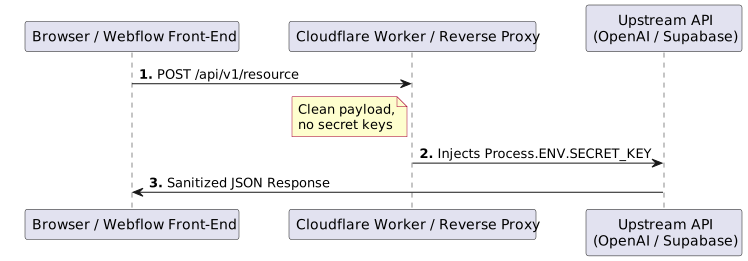
1. OpenAI API Keys in Frontend Scripts#
Embedding an OpenAI API key (sk-live-...) directly in Webflow page settings or embed blocks to run a custom AI search or chatbot allows malicious scrapers to hijack your client's billing quota. Attackers route high-volume automated requests through expensive models (like GPT-4o), racking up $3,000 to $5,000 in unauthorized billing within hours.
The Fix: Route all AI prompts through an intermediate serverless edge proxy (such as a Cloudflare Worker) where your secret key lives securely in server-side environment variables.
2. Supabase service_role Exposure#
Supabase provides two primary API keys: the anon public key and the service_role secret key. The anon key respects Row Level Security (RLS) policies. In contrast, the service_role key bypasses all RLS policies completely.
If a developer pastes the service_role key into Webflow custom code to fetch private data, any visitor can read, overwrite, or truncate the client's entire PostgreSQL database.
3. Cryptographic Webhook Validation (HMAC)#
When sending form submissions or CMS change events to external webhooks (e.g., Make, Zapier, or custom backends), programmatic webhooks generated via the Webflow Data API should always be used.
Validate inbound requests against the x-webflow-signature header using Hash-Based Message Authentication Code (HMAC-SHA256). This guarantees incoming payloads originated from Webflow and prevents malicious actors from spoofing customer submissions:
1import crypto from "node:crypto";2
3export function verifyWebflowSignature(rawBody, signatureHeader, clientSecret) {4 const hmac = crypto.createHmac("sha256", clientSecret);5 const digest = hmac.update(rawBody).digest("hex");6 7 // Timing-safe comparison prevents side-channel timing attacks8 return crypto.timingSafeEqual(9 Buffer.from(digest, "utf-8"),10 Buffer.from(signatureHeader, "utf-8")11 );12}Phase 2: Code Security & Secret Rotation Checklist
service_role or Stripe Secret keys exist anywhere in frontend scripts.Architectural Comparison: Traditional vs. Modern Handoff#
Transitioning from ad-hoc delivery to a structured operational handoff protects both your agency's legal liability and your client's digital assets.
| Operational Vector | Traditional Ad-Hoc Handoff | The AssetSnag Zero-Liability Framework |
|---|---|---|
| API Secret Management | Hardcoded directly inside Webflow Custom Code | Isolated behind serverless edge proxies; zero keys exposed in DOM |
| Workspace Roles | Contractor & guest accounts remain active indefinitely | Explicit audit & mass revocation prior to ownership transfer |
| Account Transfer Target | Handed off to personal email addresses (john@gmail.com) | Transferred strictly to corporate IT identities (it@company.com) |
| Asset & File Delivery | Scattered Google Drive folders and expiring file links | Centralized, branded portal with verified vector assets |
| Post-Launch Liability | Agency remains in the forensic blast radius for future incidents | Clean contractual handoff with signed operational transfer logs |
Delivering Value Through Operational Rigor#
High-performance agencies treat client onboarding and handoff as bookends of a singular, professional workflow. Just as you shouldn't let the hidden cost of chasing files or informal password sharing derail your project kickoffs, you cannot afford to leave your agency exposed when a project crosses the finish line.
By implementing clear Role-Based Access Control cleanup, removing client-side secrets, and formalizing your delivery protocol, you provide an enterprise-grade experience that cements client trust and protects your bottom line.
Standardize Your Agency Intake & Delivery
AssetSnag helps modern web agencies eliminate password chasing and messy asset collection with branded, zero-knowledge client portals.

Muhammet Yılmaz
Founder & Lead Architect, AssetSnag
Founder of AssetSnag & software engineer specialized in agency operations, workflow automation, and client intake UX. Building frictionless tools to eliminate agency-client asset chasing.
Related Playbooks & Articles
Handpicked articles to elevate your agency operations.
The Security Blind Spot in Agency Onboarding: Plaintext Credentials vs. Zero-Knowledge Delegation
Why collecting client credentials and API keys via email creates liability, and how client-side zero-knowledge encryption solves agency onboarding risk.
Client Access Delegation vs. Password Sharing: How Modern Agencies Onboard Accounts Without Friction
Why emailing passwords causes 2FA lockouts, security liability, and client anxiety, and how interactive guided delegation solves agency access collection.
How to Securely Collect Client Passwords (Without Failing GDPR)
Learn why collecting client passwords via Slack or email is a massive GDPR risk, and how digital agencies can securely gather credentials during onboarding.